What is a Dotfile
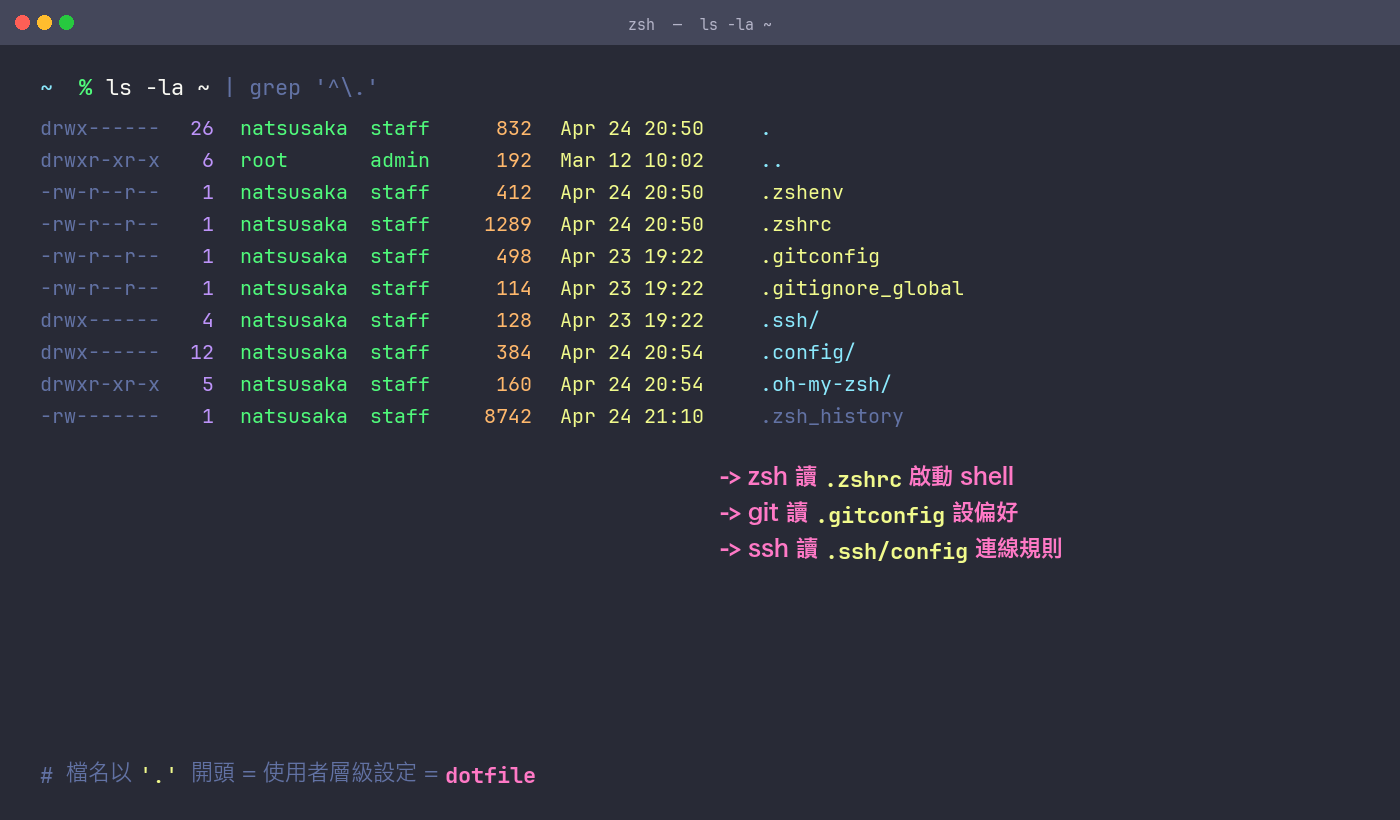
On Unix-family systems (Linux, macOS), files whose names start with . are hidden by default. Out of that convention grew an entire category of files: user-level tool configuration — dotfiles.
Common examples:
~/.zshrc— zsh interactive shell config~/.gitconfig— Git user, aliases, diff tool~/.ssh/config— SSH connection rules~/.vimrc/~/.config/nvim/— editor config~/.config/*— newer tools follow the XDG Base Directory spec and centralize here
One-line definition: plain-text files your tools read to pick up your preferences. zsh reads .zshrc at startup; Git reads .gitconfig before every command. Together these files form the "personality" of your entire command line.
Why You Need a Dotfiles Repo
When you use a single machine forever, dotfiles living in your home directory is fine. Reality says otherwise:
- New machine setup: a fresh MacBook needs shell config, git aliases, ssh config, keyboard speed, Dock behavior… half a day minimum by hand
- Multi-machine drift: desktop, laptop, remote server all carry a
.zshrcthat slowly diverges until nobody knows which is canonical - Manual config is easy to forget: six months later you can't remember why a certain alias is written that way
- Irreversible: after a pile of
defaults write, the only way back is a reinstall
The fix is to throw the whole bundle into a Git repo. That's Configuration as Code: your preferences become versioned text files, same logic as infrastructure-as-code, just scoped to your personal workstation.
Building the repo the first time takes a day or two — but it's a one-time investment. Every subsequent machine swap pays compounding interest: git clone + one script, and 90% of your environment is back.
My repo is public at https://github.com/Natsusaka0505/dotfiles. Feel free to clone or fork.
Repo Structure
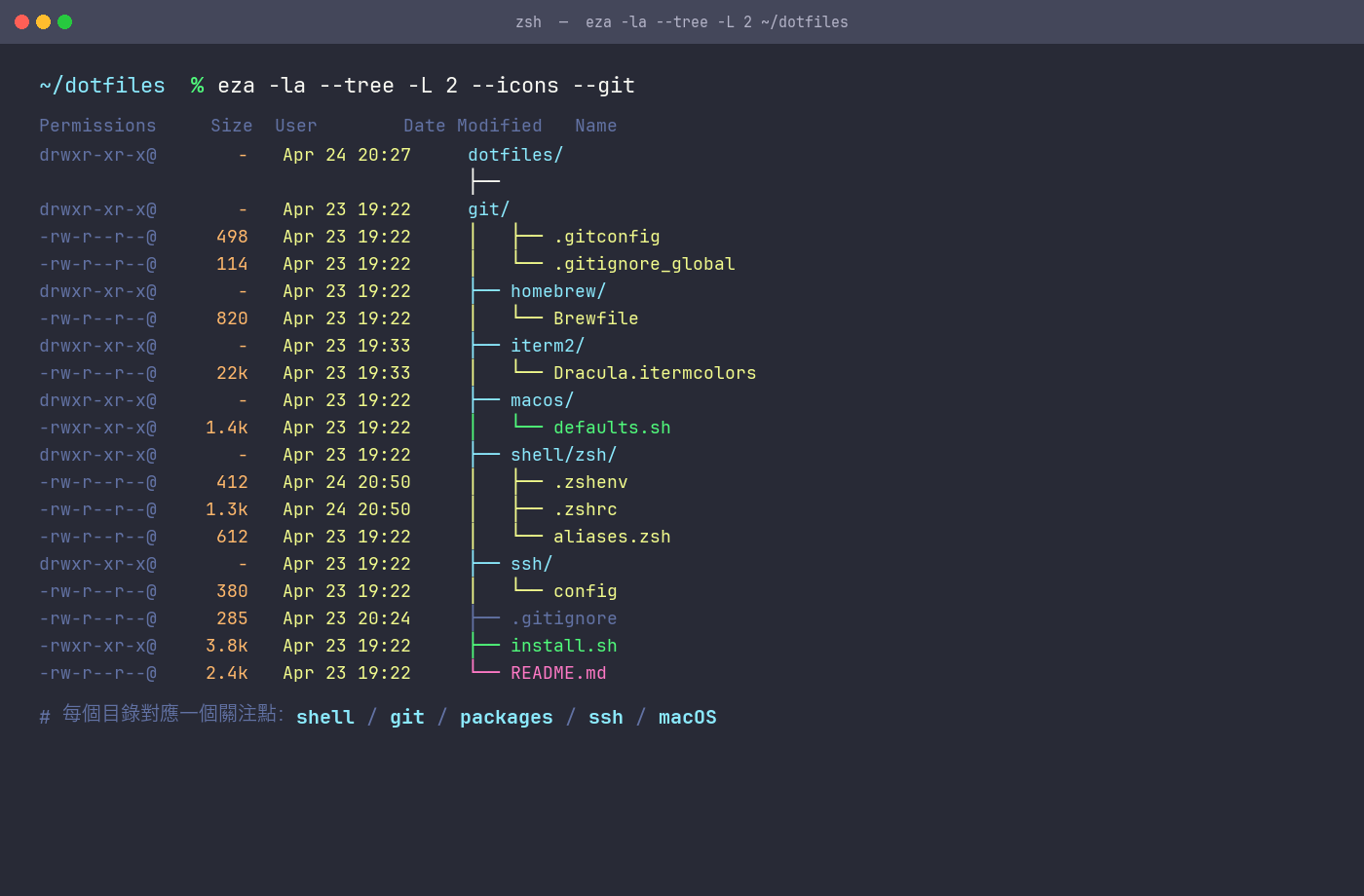
dotfiles/
├── shell/zsh/         # .zshenv / .zshrc / .zprofile / aliases.zsh
├── git/               # .gitconfig / .gitignore_global
├── homebrew/Brewfile  # brew / cask / tap list
├── ssh/config         # SSH host config (no private keys)
├── macos/defaults.sh  # Finder / Dock / keyboard / screenshot prefs
├── iterm2/            # Dracula color scheme
├── install.sh         # main install script
└── README.md
Each directory owns one concern: shell / git / packages / ssh / system prefs / terminal look. Fine-grained enough to be clear, not so fine that you can't find anything.
Anatomy of install.sh
The soul of this repo is install.sh. It solves the problem the straightforward way — symlinks — and avoids pulling in chezmoi, stow, or any other layer.
The key piece is this link() helper:
Loading...
Logic:
- If the destination already exists as a real file (not a symlink), back it up as
.bak - Create a symlink pointing into the repo
$HOME/.zshrcthen resolves to$HOME/dotfiles/shell/zsh/.zshrc— editing either side edits the versioned file
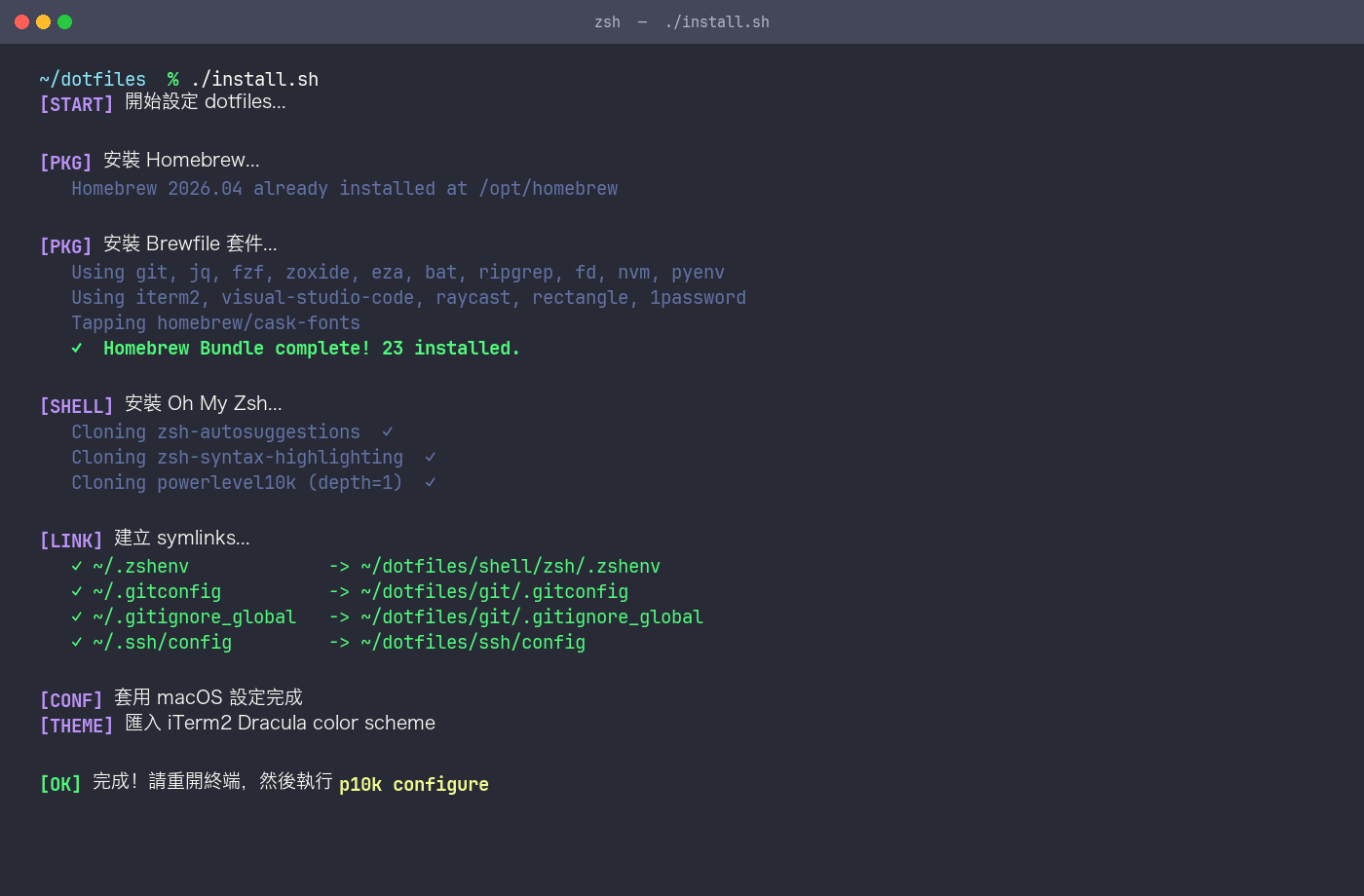
The whole script is 8 sections, one job each:
- Install Homebrew
brew bundlethe Brewfile- Install Oh My Zsh
- Clone zsh-autosuggestions / zsh-syntax-highlighting / powerlevel10k
- Create symlinks (
.zshenv,.gitconfig,.gitignore_global,.ssh/config) - Apply macOS defaults
- Install the fzf shell integration
- Download and import the iTerm2 Dracula color scheme
set -e at the top aborts on any failure, so you never end up in a half-assembled state.
Brewfile — One-Shot Package Install
brew bundle is a built-in Homebrew feature that reads a Brewfile and installs CLI / GUI / fonts in one go.
Excerpt:
Loading...
Maintenance is one line each way: brew bundle dump --force on the old machine to overwrite the Brewfile with the current state; brew bundle --file=... on the new machine to restore.
Shell Layer: zsh + Oh My Zsh + Powerlevel10k
This is where the day-to-day "feel" comes from. The clever bit lives in .zshenv:
Loading...
zsh always reads ~/.zshenv at startup (the one file it reads unconditionally). Point ZDOTDIR at the repo from there, and all subsequent files — .zshrc, .zprofile, aliases.zsh — load straight from the repo. Only one symlink needed in $HOME, not one per file.
.zshrc mainly does four things:
Loading...
- Powerlevel10k: fast, highly customizable prompt (run
p10k configurefor the interactive tour) - zsh-autosuggestions: gray-text suggestions based on history; press → to accept
- zsh-syntax-highlighting: live command coloring, typos turn red
- fzf:
Ctrl+Rfuzzy-search history,Ctrl+Tfuzzy-pick a file
aliases.zsh centralizes aliases:
Loading...
Git Config
~/.gitconfig is symlinked in. It covers user info, default branch, push / pull behavior, an [alias] block, and VS Code as editor / diff tool:
Loading...
.gitignore_global handles cross-repo noise like .DS_Store and *.swp once, so you don't rewrite it in every project.
SSH Config
~/.ssh/config holds only client behavior, never private keys:
Host *
  AddKeysToAgent yes
  UseKeychain yes
  IdentityFile ~/.ssh/id_ed25519

Host github.com
  HostName github.com
  User git
  IdentityFile ~/.ssh/id_ed25519
UseKeychain yes parks the key passphrase in the macOS Keychain, so reboots don't re-prompt. After symlinking, install.sh chmods ~/.ssh to 700 and config to 600 — SSH refuses to use looser permissions.
macOS defaults.sh
Most macOS system preferences can be scripted with defaults write. The file collects the ones I actually change on every machine:
Loading...
At the end, killall Finder Dock SystemUIServer restarts the affected apps to pick up the new values.
Secrets Strategy
Things that must never be committed:
~/.ssh/id_*(private keys)- API tokens, AWS credentials
.envfiles
This repo only ships ssh/config (behavior). Private key generation is documented in the README under "manual steps the script can't handle":
Loading...
.gitignore also excludes *.bak files produced by install.sh, .DS_Store, .zsh_history, and the user-generated p10k config.
First-Day Commands on a New Machine
Loading...
Grab a coffee; by the time you're back, the environment is ready.
Future Directions
My current bash + symlink setup is simple and direct, but there are paths to push further:
- chezmoi: template engine + secrets integration (1Password / age encryption). Fits scenarios with multiple machines that differ (work vs personal) and when you want
.envin version control - fish shell: autosuggestions and syntax highlighting out of the box, simpler to configure than zsh. Cost: not POSIX-compatible, some scripts need translation
- starship prompt: cross-shell unified prompt, Rust-fast, drop-in p10k replacement
- mise: one tool to replace nvm + pyenv + goenv, with project-level
.mise.tomlfor auto-switching
I don't need that complexity yet, but the repo will probably evolve in that direction long-term.
Full repo and issues / PRs: https://github.com/Natsusaka0505/dotfiles. Happy to hear better approaches.